Grab and Decorate Getting Started Guide
Your first hour in Evil Tomato’s smash-and-decorate Roblox experience.
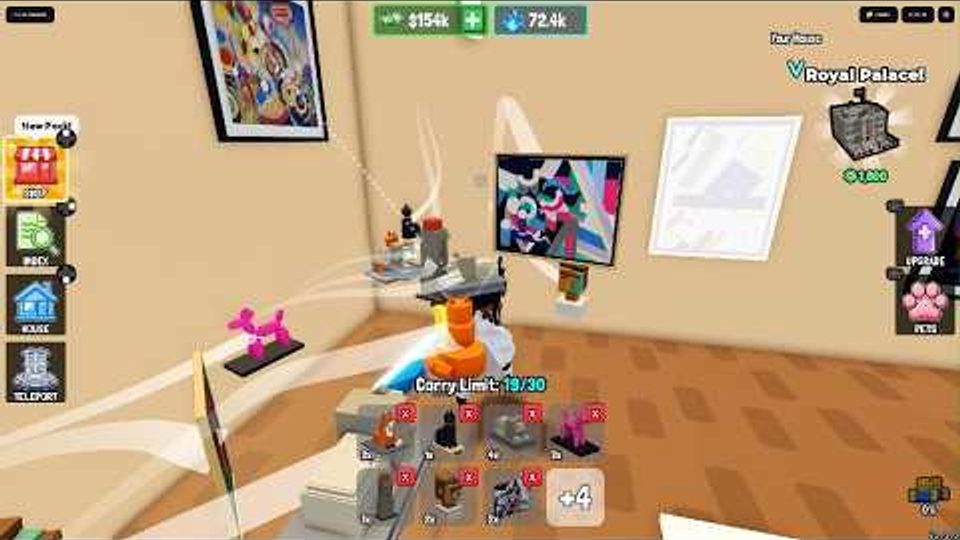
Grab and Decorate throws you into a simple fantasy: smash delivery trucks, grab the furniture they spill, drag everything home, and turn an empty house into something you actually want to show off. Cash funds weapon upgrades so the next trucks fall faster. The Mall sells pieces trucks may never drop. Leveling unlocks more rooms. Pets and badges give long-term goals. This getting started guide walks through day one in order so you do not waste your first sessions guessing the loop.
Join and claim the Welcome badge
Open Grab and Decorate on Roblox (Evil Tomato). Your first join awards the Welcome! badge automatically. Take a moment to find your house plot, the truck routes, the code button on the right side of the screen, and any UI that covers weapons, inventory, and decorating. You do not need a perfect layout yet—you need to understand where loot goes and how to return home safely after a smash.
Smash your first delivery trucks
Head to the roads where delivery trucks travel. Attack until the truck breaks and furniture spills out. Grab the pieces you want and carry them back to your house. Early trucks are meant to teach the loop: smash, grab, return, place. Do not overthink rarity on the first few runs; common tables and chairs still fill empty floors and teach placement controls. When combat feels slow, that is your cue to spend cash on a weapon upgrade instead of stacking more random chairs you will replace later. For a deeper combat and farming breakdown, continue with Smash Trucks after this page.
Redeem the BEGINNER code immediately
Before you grind for hours, open CODES on the right, type BEGINNER exactly, and redeem. That code grants 3 Shelf Tables and 4 Coffee Tables—free starter furniture that skips several early truck runs. While you are in the codes panel, also try BLURPLE (exclusive-tier furniture), GOBBLE26 (common Thanksgiving set pieces), and MILLIONGIFT (One Million Foil Balloons, Million Gift Box, and One Million Visits Trophy) if they are still active. Always match capitalization. Full reward notes and redemption steps live on the Codes hub; check it whenever you return after an update.
Bring loot home and decorate the basics
Furniture only helps once it is placed. Carry drops into your house, enter decorate mode, and put down the BEGINNER tables plus anything trucks gave you. Focus on one room first: a clear path, a few surfaces, and enough seating so the space feels intentional. Learn how to move, rotate, and remove pieces before you fill every corner. Painting walls and coordinating colors can wait until you understand placement—then follow Decorate and Paint for layout and paint tips. Empty rooms look worse than sparse, thoughtful rooms, so leave walking space.
Early weapon upgrades and cash flow
Cash from successful runs should go into weapon upgrades early. A stronger weapon shortens smash time, which means more furniture and more cash per minute. Resist spending everything on Mall cosmetics until your weapon can handle the trucks you actually fight. Upgrade in small steps, test the next truck tier, and only then decide whether you need another combat bump or a furniture shopping trip. The Tier List hub helps you judge which upgrades and furniture priorities are worth cash when you have choices.
Mall intro without getting overwhelmed
Trucks are random; the Mall is intentional. Once you have a usable weapon and a partially furnished starter room, visit the Mall to browse pieces that fill style gaps—matching sets, better seating, or decorations trucks rarely drop. Buy only what you will place this session. Hoarding Mall purchases you never install wastes cash you could have put into weapons. When you are ready for shopping strategy and priority lists, open the full Mall Guide.
Level up, unlock rooms, and plan pets
As you play, leveling unlocks more rooms in the default house. More rooms mean more decorating goals and eventually the rare Full House badge when every room is unlocked. Do not ignore expansion—cramming everything into one starter room makes later layouts painful. Read How to Unlock Rooms once you outgrow the first space. Pets unlock the New Best Friend badge when you buy one; treat pets as a mid-term goal after weapons and room unlocks feel stable. Badge and companion goals are also summarized under Players.
Day-one checklist
- Join and note your house, truck routes, and CODES button.
- Smash a few easy trucks and return with loot.
- Redeem BEGINNER (and other live codes on Codes).
- Place tables and early furniture in one starter room.
- Spend cash on a weapon upgrade, then farm again.
- Peek at the Mall for one or two missing pieces.
- Keep leveling toward new rooms; bookmark Unlock Rooms and Decorate and Paint.
Follow that order and your first hour builds combat power, free furniture, and a house that already looks intentional—ready for tougher trucks, bigger layouts, and seasonal updates tracked on Updates.
Frequently Asked Questions
Quick answers for Grab and Decorate players.
What should I do first in Grab and Decorate?
Smash a couple of easy trucks, redeem the BEGINNER code for free tables, place furniture at home, then upgrade your weapon before long Mall shopping trips.
Where do I redeem codes?
Click CODES on the right side of the screen, enter the code exactly (for example BEGINNER), and press REDEEM. See the Codes hub for the full active list.
Should I upgrade weapons or buy Mall furniture first?
Prioritize early weapon upgrades so trucks break faster. Use Mall purchases to fill style gaps after combat feels comfortable.
How do I unlock more rooms?
Level up through normal play. Each unlock adds house space; filling every default room is tied to the Full House badge. See the Unlock Rooms guide for details.
What badges can new players earn?
Welcome! comes from joining. New Best Friend comes from buying a pet. Full House requires unlocking every room in the default house.